


Introduction
The MailOptimal API allows you to programmatically access and automate almost every major functionality available inside MailOptimal.
With the API, you can:
- Connect and manage email accounts
- Configure and monitor warmup settings
- Access warmup analytics
- Create and manage email campaigns
- Manage leads and prospects
- Access replies from Unified Inbox
- Build custom integrations and workflows
- Automate outbound operations at scale
Whether you're building internal tools, integrating with CRMs, automating workflows, or creating custom dashboards, the MailOptimal API gives you full flexibility to interact with your MailOptimal workspace programmatically.
API Documentation
Official API Documentation:
The documentation includes:
- Authentication
- Endpoint references
- Request & response examples
- Error handling
- API schemas
- Testing interface
Getting Your API Key
To use the API, you first need your API key.
Steps to Generate or Access API Key
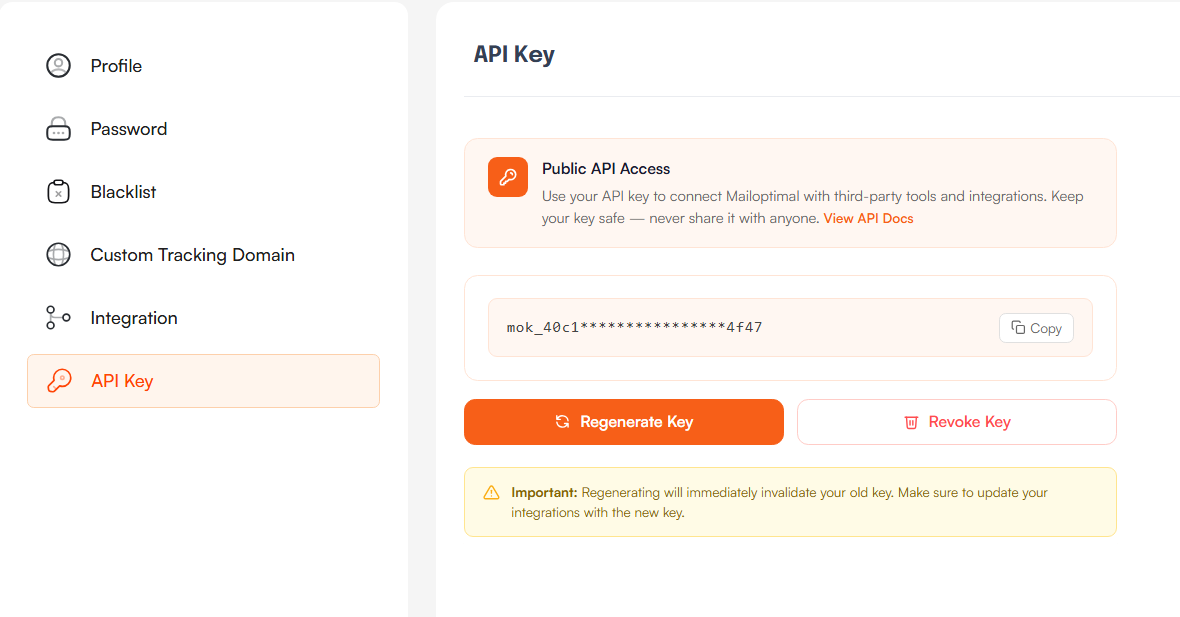
- Log in to your MailOptimal account
- Go to Settings
- Click on API Key
- Copy your API key
You can also regenerate or revoke your API key anytime from the same section.
Important Notes
- Keep your API key secure
- Never share your API key publicly
- Regenerating the key will immediately invalidate the previous key
- Update your integrations after regenerating the key
Authentication
MailOptimal APIs use API Key authentication.
Include your API key in the request headers.
Example:
Authorization: Bearer YOUR_API_KEY
Example cURL request:
curl --request GET \
  --url https://api.mailoptimal.com/v1/ \
  --header 'Authorization: Bearer YOUR_API_KEY'
What You Can Automate Using APIs
1. Email Account Management
Using APIs, you can:
- Connect email accounts
- Fetch connected accounts
- Update account settings
- Monitor account health
- Manage sending configurations
Common Use Cases
- Bulk mailbox provisioning
- Automated onboarding workflows
- Syncing mailbox data with internal systems
2. Warmup Automation
Automate all your email warmup activities.
Features
- Enable/disable warmup
- Configure warmup settings
- Monitor deliverability metrics
- Fetch warmup analytics
- Manage warmup behavior programmatically
Common Use Cases
- Auto-enable warmup for new mailboxes
- Build custom deliverability dashboards
- Centralize warmup monitoring
3. Email Campaign Management
Manage outbound campaigns entirely through APIs.
Features
- Create campaigns
- Start/pause campaigns
- Manage sending schedules
- Track campaign performance
- Update campaign configurations
Common Use Cases
- CRM-triggered outbound campaigns
- Automated lead nurturing
- Multi-client campaign management
4. Lead Management
Programmatically manage leads and prospect data.
Features
- Add leads
- Update prospect information
- Import/export lead data
- Organize leads into campaigns
- Sync lead databases
Common Use Cases
- CRM synchronization
- Automated lead enrichment
- Lead routing systems
5. Unified Inbox & Replies
Access and manage conversations directly through APIs.
Features
- Fetch replies
- Monitor conversations
- Build custom inbox workflows
- Sync replies with external systems
Common Use Cases
- CRM activity syncing
- Slack/Discord notifications for replies
- AI-powered reply analysis
- Centralized customer communication workflows
Example Use Cases
Here are some practical ways customers use the MailOptimal API:
CRM Integration
Automatically sync leads, campaigns, and replies between MailOptimal and your CRM.
Automated Mailbox Setup
Provision and configure mailboxes automatically for new users or clients.
Custom Reporting Dashboards
Build internal dashboards for:
- Deliverability monitoring
- Campaign performance
- Warmup analytics
- Reply tracking
Workflow Automation
Connect MailOptimal with tools like:
- Zapier
- Make
- n8n
- HubSpot
- Salesforce
- Custom internal tools
API Best Practices
Keep API Keys Secure
- Store keys securely
- Use environment variables
- Never expose keys in frontend applications
Handle Errors Properly
Implement proper error handling and retries in your integrations.
Respect Rate Limits
Avoid sending excessive requests in short intervals.
Monitor Integrations
Track failures and monitor API activity to ensure stable automations.
Regenerating or Revoking API Keys
If you believe your API key has been exposed:
- Go to Settings → API Key
- Click Regenerate Key or Revoke Key
- Update all connected integrations immediately
Troubleshooting
Authentication Errors
Make sure:
- Your API key is correct
- The Authorization header is properly formatted
- The key has not been revoked
Requests Failing
Check:
- Endpoint URLs
- Request payload format
- Required fields
- API documentation examples
Need Help?
If you face any issues while using the API, feel free to contact the MailOptimal support team.
You can also refer to the official API documentation for complete endpoint references and implementation examples: